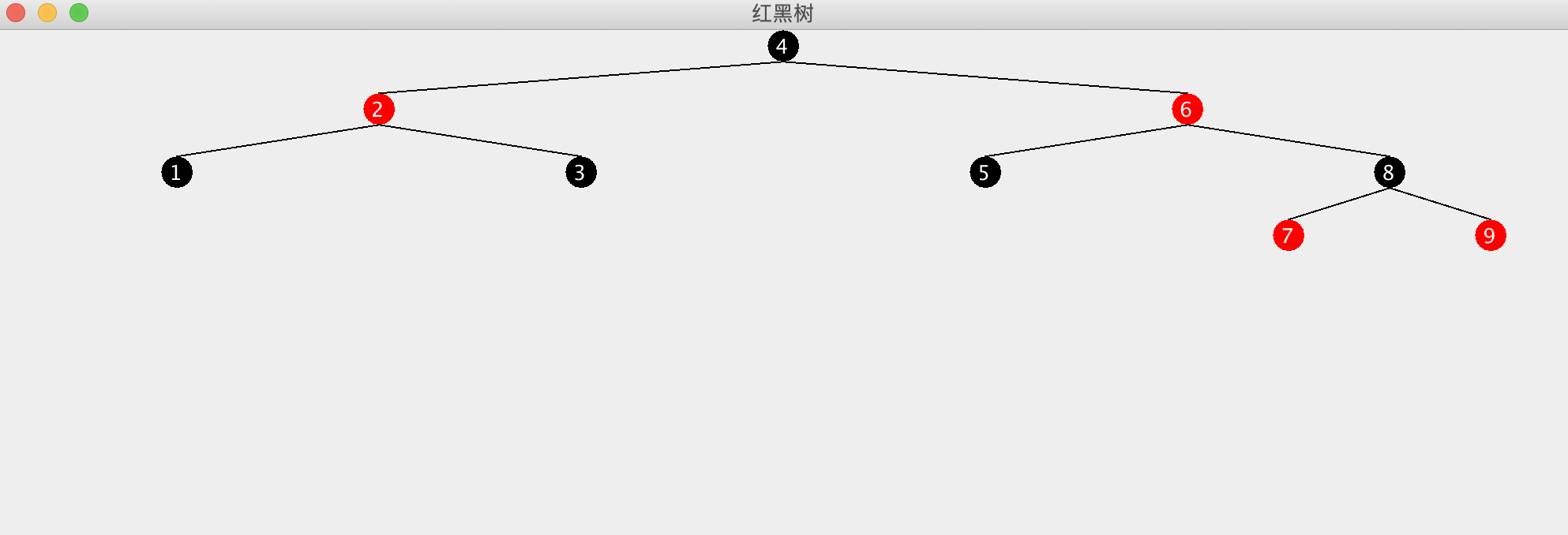
之前看 HashMap jdk1.8中的源码,就有提到红黑树,这次我们来了解以下红黑树究竟是怎样一种数据结构。
定义
红黑树(Red Black Tree)RBT 是一种自平衡二叉查找树,是在计算机科学中用到的一种数据结构,典型的用途是实现关联数组。
它是在1972年由Rudolf Bayer发明的,当时被称为平衡二叉B树(symmetric binary B-trees)。后来,在1978年被 Leo J. Guibas 和 Robert Sedgewick 修改为如今的“红黑树”。
红黑树和AVL树类似,都是在进行插入和删除操作时通过特定操作保持二叉查找树的平衡,从而获得较高的查找性能。
它虽然是复杂的,但它的最坏情况运行时间也是非常良好的,并且在实践中是高效的:它可以在O(log n)时间内做查找,插入和删除,这里的n是树中元素的数目。
二叉查找树
二叉查找树,Binary Search Tree 「BST」,我们首先看下二叉查找树有哪些特性呢?
- 某节点的左子树节点值仅包含小于该节点值
- 某节点的右子树节点值仅包含大于该节点值
- 左右子树每个也必须是二叉查找树
红黑树特征:
- 每个节点非黑即红
- 根节点是黑色的
- 每个叶节点都是黑色的
- 一个红色节点的直接子节点都是黑色的(不能有两个红色节点连着有父子关系)
- 从任意一个节点到叶节点,经过的黑色节点个数(黑高)是一样的
红黑树动态演示
这个网站可以帮助理解红黑树插入删除的过程。
变色的时机可能不太对,他统一放在最后变色了,理解上习惯右旋后直接变色,来判断下一步操作。
插入操作
插入会改变树的节点,树节点改变会有以下两种方式。
- 变色 recolor
- 旋转 rotation
为防止树全黑,且为了方便根节点到子节点黑色数相等,插入一般预设为红色节点
变色:
条件:父红叔红变颜色
颜色变化:父变黑,叔变黑,爷变红,如果变色不能达到红黑树的要求,再尝试旋转。
左旋
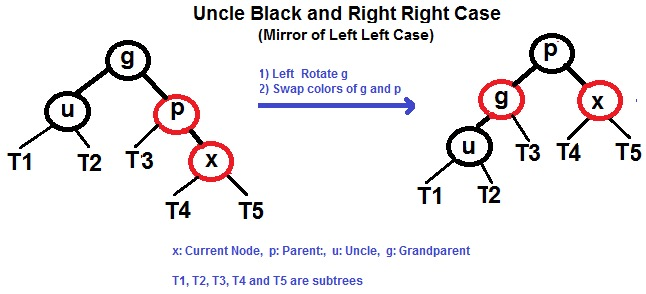
条件:父红叔黑右子树
右旋
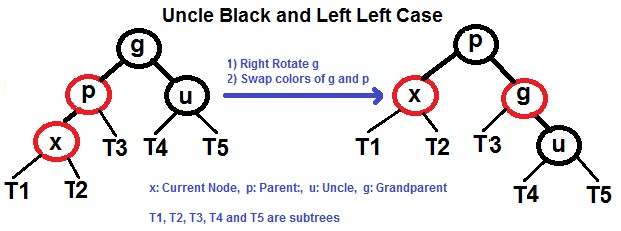
条件:父红叔黑左子树
4种情况
- 父左子左
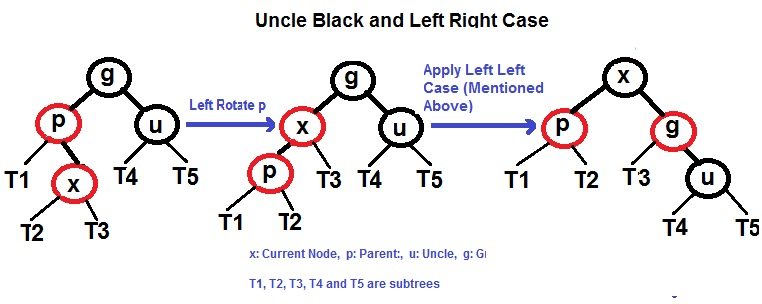
- 父左子右
- 父右子右
- 父右子左
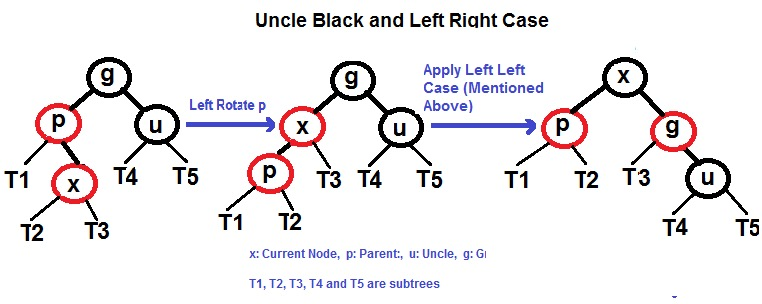
删除操作
// todo 删除操作太麻烦了,先搁置
真佩服那些面试能手写红黑树的大佬,我能记个插入的几种情况就不错了,还得看着规则写。能写出删除操作的是真牛!!!小弟在此给大佬顶礼膜拜Orz。
手写红黑树代码
花了三天时间写出来的,估计挺多漏洞的,不过自己测了测插入目前没遇到啥问题,删除回头有空再写吧。算是自己造了个方形的轮子。
有点好处就是写了个toImage()方法,可以将构造的红黑树画出来,比较直观。下面上代码:
import javax.swing.*;
import java.awt.*;

/**
 * @ClassName RedBlackTree
 * @Description 红黑树
 * @Author leo
 * @Date 2019-09-24 09:57
 **/
public class RedBlackTree extends JFrame {
    static final int R = 0;//红色
    static final int B = 1;//黑色
    Node root;

    public RedBlackTree() {
        super();
        initialize(500);// 调用初始化方法
    }

    static class Node {
        //颜色
        int color;
        //值
        int value;
        //父节点
        Node parent;
        //左节点
        Node left;
        //右节点
        Node right;

        public Node(int value) {
            this.color = R;
            this.value = value;
        }
    }

    /**
     * 插入新节点 值为参数
     *
     * @param value
     */
    public void insert(int value) {
        Node newNode = new Node(value);
        insert(newNode);
    }

    /**
     * 插入新节点
     *
     * @param newNode
     */
    public void insert(Node newNode) {
        Node curNode = root;
        if (root == null) {
            root = newNode;
            //判断是否符合规则
            judgeRule(newNode);
        } else if (curNode.value > newNode.value) {
            if (curNode.left != null) {
                insert(curNode.left, newNode);
            } else {
                curNode.left = newNode;
                newNode.parent = curNode;
                //判断是否符合规则
                judgeRule(newNode);
            }
        } else {
            if (curNode.right != null) {
                insert(curNode.right, newNode);
            } else {
                curNode.right = newNode;
                newNode.parent = curNode;
                //判断是否符合规则
                judgeRule(newNode);
            }
        }
    }

    /**
     * 插入递归寻找合适位置
     *
     * @param curNode
     * @param newNode
     */
    public void insert(Node curNode, Node newNode) {
        if (curNode.value > newNode.value) {
            if (curNode.left != null) {
                insert(curNode.left, newNode);
            } else {
                curNode.left = newNode;
                newNode.parent = curNode;
                //判断是否符合规则
                judgeRule(newNode);
            }
        } else {
            if (curNode.right != null) {
                insert(curNode.right, newNode);
            } else {
                curNode.right = newNode;
                newNode.parent = curNode;
                //判断是否符合规则
                judgeRule(newNode);
            }
        }
    }

    /**
     * 判断是否符合规则
     *
     * @param curNode
     */
    public void judgeRule(Node curNode) {
        //判断是否父节点也是红色
        if (curNode.parent == null) {
            //父节点为空,说明节点是根节点,变黑色
            curNode.color = B;
            root = curNode;
        } else {
            //不是根节点
            if (curNode.parent.color == R) {
                //父节点也为红色
                Node grandparent = curNode.parent.parent;
                Node uncle;
                int parentLR; //0左 1右
                if (curNode.parent == grandparent.left) {
                    parentLR = 0;
                    //父亲左子树
                    if (grandparent.right != null) {
                        //不为null
                        uncle = grandparent.right;
                    } else {
                        //null节点 黑色
                        uncle = null;
                    }
                } else {
                    parentLR = 1;
                    //父亲右子树
                    if (grandparent.left != null) {
                        //不为null
                        uncle = grandparent.left;
                    } else {
                        //null节点 黑色
                        uncle = null;
                    }
                }
                if (uncle != null && uncle.color == R) {
                    //父红叔红变颜色
                    recolor(curNode, uncle);
                } else {
                    //父红叔黑判断 当前节点左右子树
                    if (curNode.value < curNode.parent.value) {
                        if (parentLR == 0) {
                            //父左子左 右旋
                            rightRotate(curNode.parent);
                        } else {
                            //父右子左 右旋
                            RLRotate(curNode);
                            leftRotate(curNode);
                        }

                    } else {
                        if (parentLR == 1) {
                            //父右子右 左旋
                            leftRotate(curNode.parent);
                        } else {
                            //父左子右 左旋
                            LRRotate(curNode);
                            rightRotate(curNode);
                        }
                    }
                }
            }
        }
    }

    /**
     * 变色
     *
     * @param curNode
     * @param uncle
     */
    private void recolor(Node curNode, Node uncle) {
        //父变黑
        curNode.parent.color = B;
        //叔变黑
        uncle.color = B;
        //爷变红
        uncle.parent.color = R;
        judgeRule(uncle.parent);
    }

    /**
     * 左旋 父子互换,前父挂左子,前子挂前爷,父子颜色互换
     *
     * @param curNode
     */
    private void leftRotate(Node curNode) {
        //当前父节点
        Node parent = curNode.parent;
        //当前爷节点
        Node grandparent = curNode.parent.parent;
        //判断爷节点是否为空
        if (grandparent != null) {
            //如果不为空
            if (parent == grandparent.left) {
                //父节点是左子树,当前节点就挂爷节点左子树
                grandparent.left = curNode;
            } else {
                //父节点是右子树,当前节点就挂爷节点右子树
                grandparent.right = curNode;
            }
        }
        //当前父节点挂在当前节点左子树
        parent.parent = curNode;
        //当前节点左子树挂在前父节点右子树
        parent.right = curNode.left;
        if (parent.right != null) {
            parent.right.parent = parent;
        }
        //当前节点左子树指向当前父节点
        curNode.left = parent;
        //当前节点挂到当前爷节点上
        curNode.parent = grandparent;
        //当前节点和当前父节点变色
        int color = curNode.color;
        curNode.color = parent.color;
        parent.color = color;
        if (curNode.parent == null) {
            root = curNode;
        }
    }

    /**
     * 右旋 左子树
     */
    private void rightRotate(Node curNode) {
        //当前父节点
        Node parent = curNode.parent;
        //当前爷节点
        Node grandparent = curNode.parent.parent;
        if (grandparent != null) {
            if (parent == grandparent.left) {
                grandparent.left = curNode;
            } else {
                grandparent.right = curNode;
            }
        }
        //当前父节点挂在当前节点左子树
        parent.parent = curNode;
        //当前节点右子树挂在前父节点左子树
        parent.left = curNode.right;
        if (parent.left != null) {
            parent.left.parent = parent;
        }
        //当前节点左子树指向当前父节点
        curNode.right = parent;
        //当前节点挂到当前爷节点上
        curNode.parent = grandparent;
        //当前节点和当前父节点变色
        int color = curNode.color;
        curNode.color = parent.color;
        parent.color = color;
        if (curNode.parent == null) {
            root = curNode;
        }
    }

    /**
     * 右左情况前置操作
     *
     * @param curNode
     */
    private void RLRotate(Node curNode) {
        //当前父节点
        Node parent = curNode.parent;
        //当前爷节点
        Node grandparent = curNode.parent.parent;
        //当前节点挂到爷节点上
        curNode.parent = grandparent;
        //爷节点的右子树指向当前节点
        grandparent.right = curNode;
        //前父节点挂当前节点
        parent.parent = curNode;
        //当前节点右子树
        parent.left = curNode.right;
        if (parent.left != null) {
            parent.left.parent = parent;
        }
        //当前节点
        curNode.right = parent;

    }

    /**
     * 左右情况前置操作
     *
     * @param curNode
     */
    private void LRRotate(Node curNode) {
        //当前父节点
        Node parent = curNode.parent;
        //当前爷节点
        Node grandparent = curNode.parent.parent;
        //当前节点挂到爷节点上
        curNode.parent = grandparent;
        //爷节点的左子树指向当前节点
        grandparent.left = curNode;
        //前父节点挂当前节点
        parent.parent = curNode;
        //当前节点右子树挂前父节点左子树
        parent.right = curNode.left;
        if (parent.right != null) {
            parent.right.parent = parent;
        }
        curNode.left = parent;

    }

    /**
     * 画布初始化
     *
     * @param paperSize
     */
    private void initialize(int paperSize) {// 初始化方法
        this.setSize(paperSize * 2, paperSize);// 设置窗体大小
        setDefaultCloseOperation(EXIT_ON_CLOSE);/// 设置窗体关闭方式
        this.setTitle("绘制几何图形");// 设置窗体标题
        MyCanvas c = new MyCanvas(paperSize);// 创建画布对象
        add(c);// 将画布添加到窗体中
    }

    private class MyCanvas extends Canvas {// 创建内部类MyCanvas继承Canvas
        //节点半径
        int nodeRadius = 10;
        //画布大小
        int paperSize;
        //层级限制
        int levelLimit = 6;
        //连线在x轴投影长度计算常量
        int xLineLength = 512;

        MyCanvas(int paperSize) {
            this.paperSize = paperSize;
        }


        @Override
        public void paint(Graphics g) {
            Graphics2D g2 = (Graphics2D) g;// 调用新画图类Graphics2D(强制转化为Graphics2D这个类)
            draw(g2, paperSize - nodeRadius, 0, root, 1);
        }

        private void draw(Graphics2D g2, int x, int y, Node node, int level) {
            if (level > levelLimit) {
                level = levelLimit;//设置大于level限制,线x轴长度就不变了,展示可能会重叠,画布越大这个层级可以越高
            }
            //设置节点颜色
            g2.setColor(node.color == 1 ? Color.BLACK : Color.RED);
            //画填充色圆
            g2.fillOval(x, y, nodeRadius * 2, nodeRadius * 2);// 画一个圆形-坐标、宽高(Draw方法绘制的图形是空心的)
            //设置值的颜色为白色
            g2.setColor(Color.WHITE);
            g2.drawString(String.valueOf(node.value), x + nodeRadius / 2, y + nodeRadius / 2 * 3);
            //连线颜色为黑色
            g2.setColor(Color.BLACK);
            //线x轴投影长度
            int lineX = xLineLength >> level++;
            if (node.left != null) {
                g2.drawLine(x + nodeRadius, y + nodeRadius * 2, x + nodeRadius - lineX, y + nodeRadius * 4);
                draw(g2, x - lineX, y + nodeRadius * 4, node.left, level);
            }
            if (node.right != null) {
                g2.drawLine(x + nodeRadius, y + nodeRadius * 2, x + nodeRadius + lineX, y + nodeRadius * 4);
                draw(g2, x + lineX, y + nodeRadius * 4, node.right, level);
            }
        }

    }
}
测试代码
public static void main(String[] args){
        int[] arr = {1,2,3,4,5,6,7,8,9};
        RedBlackTree rbt = new RedBlackTree();
        for (int a:arr){
            rbt.insert(a);
        }
        rbt.setVisible(true);
    }
输出图像